What it does
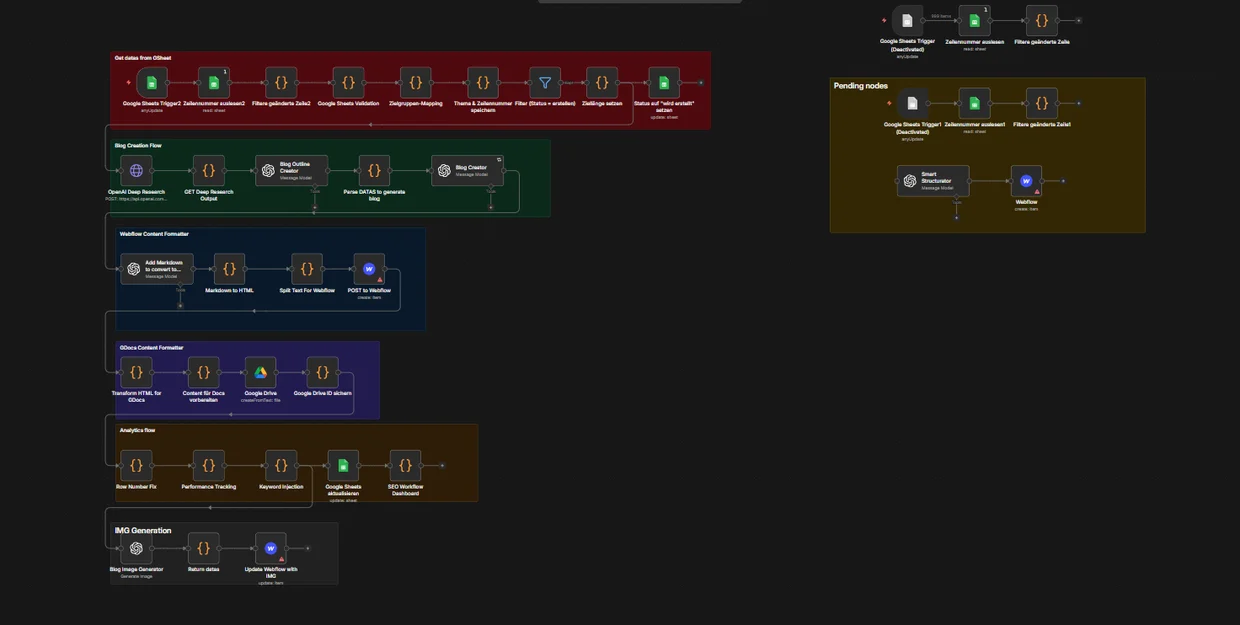
A row in a Google Sheet is the only input. From there the workflow researches the topic, generates the outline, writes the long-form article, converts it for the target platform, publishes it to Webflow, saves a copy to Google Docs, generates and attaches images, and writes performance data back to the sheet.
How it is organised
The canvas is split into labelled groups rather than one long chain, because a pipeline this size is unmaintainable otherwise: sheet intake and validation, blog creation, Webflow formatting, Google Docs formatting, analytics, and image generation.
Each group can be paused or rerun on its own. When a step fails, you know which one without reading the whole graph.
Why it is built this way
Content automations usually break at the boundaries: markdown that does not survive the move into a CMS, images that arrive after publication, analytics nobody wires back. Each of those got its own group here, with its own formatting step, so a change in one does not silently corrupt another.
This project is shown as the workflow itself rather than as published output, because the output belongs to the client.